

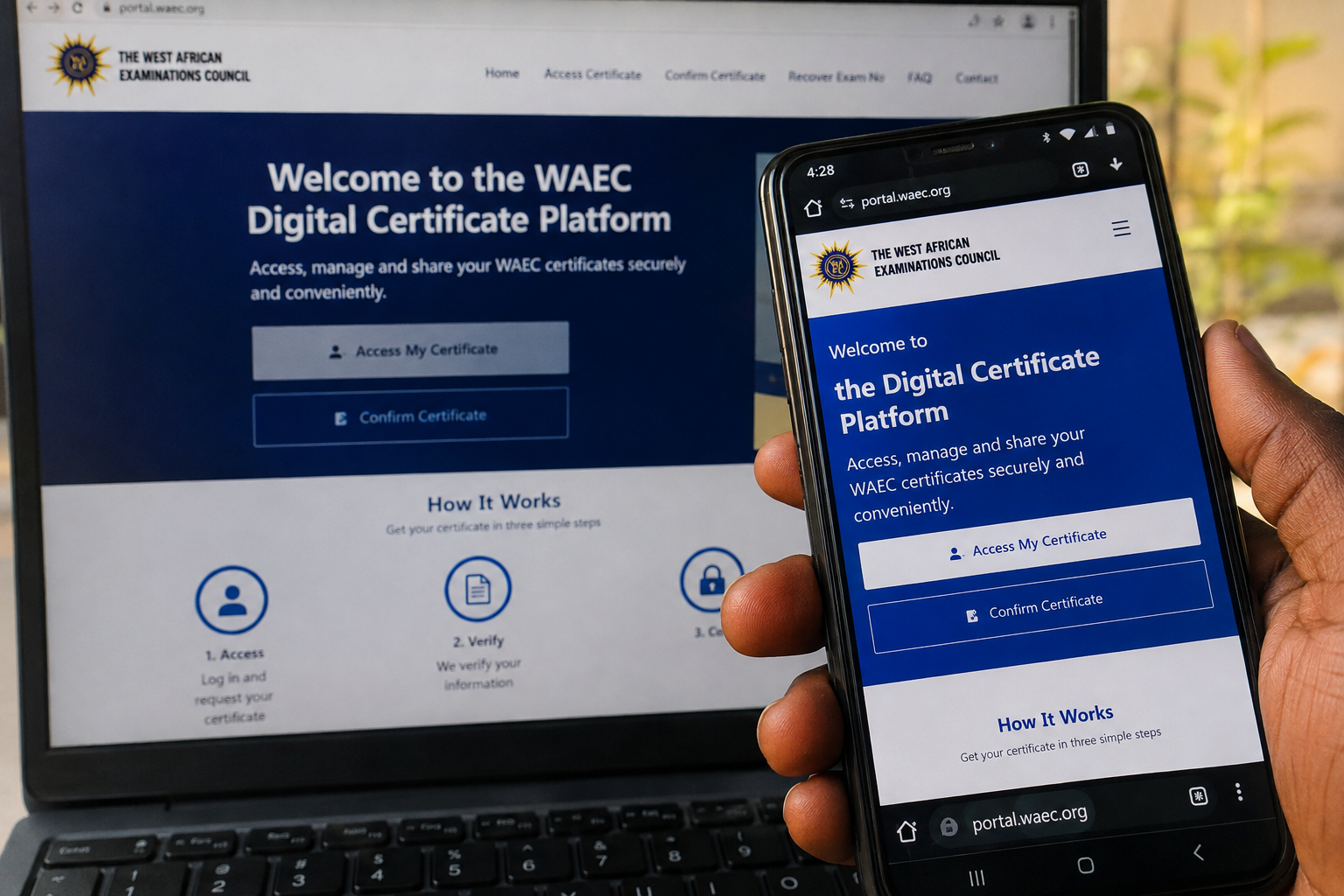
2026 WAEC Certificate Online: How to Access, Download and Share Your WASSCE Certificate by Phone
Candidates who participated in the 2026 West African Senior School Certificate Examination (WASSCE) for School Candidates are increasingly looking for information about how to access their WAEC certificate online after the release of their examination results.
The West African Examinations Council (WAEC) operates a Digital Certificate Platform that allows candidates to access, view, save, download and share digital copies of their certificates. The platform is also designed to allow institutions and organisations to confirm the authenticity of certificates presented by candidates.
For candidates who need their WAEC certificate for admission, employment, scholarship applications, international education or other official purposes, the digital certificate system can make the process considerably easier because it reduces dependence on physically collecting and carrying paper certificates.
WAEC says its Digital Certificate Platform is available as a web-based and mobile service and provides features for accessing, sharing and confirming certificates. The Council has also expanded the digital certificate service across its member countries, including Nigeria, Ghana, The Gambia, Liberia and Sierra Leone.
This article explains how the WAEC digital certificate system works, how candidates can access their certificate using a phone, the information they may need, how to download and share the certificate, how institutions can verify it and the difference between checking a WAEC result and accessing a WAEC certificate.
What Is the WAEC Digital Certificate?
The WAEC Digital Certificate is an electronic version of a candidate’s official WAEC examination certificate that can be accessed through WAEC’s Digital Certificate Platform.
The service was introduced to make it easier for candidates and other authorised users to access and verify WAEC certificates without depending entirely on physical copies.
According to WAEC, the platform allows users to access, share, request and confirm certificates. It also includes a recovery feature for candidates who have forgotten their examination numbers.
This means that a candidate who needs to provide proof of their WAEC qualification may be able to obtain the digital certificate through the official platform and share it with an institution or organisation.
The system is particularly useful for candidates who have moved away from the location where they originally obtained their certificate or who need to provide their academic credentials quickly.
Is the 2026 WAEC Certificate Available Online?
Candidates who sat the 2026 WASSCE for School Candidates should use the official WAEC Digital Certificate Platform to determine whether their certificate has been released and is available for access.
WAEC’s official Digital Certificate website currently provides an option for candidates to access certificates online. The official platform also provides separate services for certificate confirmation and examination-number recovery.
However, candidates should understand that the availability of a digital certificate depends on whether WAEC has released the certificate for the particular examination and candidate.
Therefore, if a candidate has already checked their 2026 WASSCE result but cannot yet access the certificate, it does not necessarily mean that the candidate’s result is invalid. The release of an examination result and the availability of the corresponding certificate are related but separate processes.
Candidates should therefore rely on the official WAEC platform rather than unofficial websites claiming to provide certificates.
How to Access Your 2026 WAEC Certificate by Phone
One of the biggest advantages of the WAEC Digital Certificate Platform is that candidates can access the service using a smartphone.
You do not necessarily need to visit a cybercafé or WAEC office simply to find out whether your digital certificate is available.
If you have a smartphone with an internet connection, you can use the official WAEC Digital Certificate Platform.
Step 1: Get Your Phone Ready
Before beginning the process, make sure your smartphone has:
- A working internet connection
- A valid browser
- Your WAEC examination information
- Your identification details
- Access to the phone number required for verification, where applicable
It is important to use your own information when completing the verification process.
Do not give your WAEC examination details or identification information to unofficial websites or individuals claiming that they can access the certificate for you.
Step 2: Visit the Official WAEC Digital Certificate Platform
Open the browser on your smartphone and visit the official WAEC Digital Certificate Platform.
The official WAEC website provides access to the certificate service, including the certificate-access and certificate-confirmation sections.
Candidates should carefully check the website address before entering personal or examination information.
This is particularly important because examination information is sensitive and should not be entered into random websites advertised on social media.
Step 3: Create an Account or Log In
Depending on your situation, you may need to create an account or sign in to an existing WAEC Digital Certificate account.
WAEC’s platform provides an account-creation process for users who want to access or confirm certificates.
Enter the information requested by the official platform.
Make sure that the details you provide match the information associated with your examination and identification records.
Step 4: Select Certificate Access
After logging in, look for the option relating to accessing a certificate.
The Digital Certificate Platform has separate functions for accessing certificates and confirming certificates.
Candidates who own the certificate should use the certificate-access service.
The confirmation service is intended for institutions, organisations and other parties that need to verify the authenticity of a certificate.
Step 5: Enter Your Examination Details
The platform may request information needed to identify your examination record.
Candidates should carefully enter the required details.
An incorrect examination number, examination year or identification detail may prevent the system from successfully matching the candidate’s information.
If you are unsure about any information, check your official examination documents before submitting the form.
WAEC also provides a separate service that can help eligible users recover forgotten examination numbers.
Step 6: Complete Identity Verification
The certificate platform uses identity and security checks to ensure that certificates are accessed by authorised users.
Depending on the account and verification process, you may be asked to provide identification information or complete an OTP verification.
The purpose of this process is to protect candidates’ certificates and personal information.
WAEC has previously explained that accurate identity information is important when accessing certificates through the digital platform.
If your identification information does not match your WAEC records, you may encounter difficulties during verification.
Step 7: View Your Digital Certificate
Once the verification process has been successfully completed and your certificate is available, the certificate can be accessed through the platform.
Review the information displayed on the certificate carefully.
Check details such as:
- Candidate name
- Examination details
- Examination year
- Subjects
- Grades
- Certificate information
- Other identifying information
If you notice an error, do not attempt to alter the certificate yourself.
Instead, contact WAEC through its official support channels for guidance.
Step 8: Download Your Certificate
Where the certificate is available for download, follow the download option provided on the official platform.
The downloaded file can be saved securely on your phone.
Candidates should consider keeping a backup copy in a secure location, such as a trusted cloud-storage account or another personal device.
However, candidates should also remember that the digital certificate is not simply an ordinary image or document created by the candidate. Its authenticity can be confirmed through WAEC’s verification system.
Can I Access My WAEC Certificate Without a Computer?
Yes. WAEC describes its Digital Certificate Platform as a mobile and web-based service, meaning candidates can use mobile devices to access the service.
This is useful for candidates who do not have access to a laptop or desktop computer.
A smartphone with a stable internet connection may be enough to access the platform, depending on the service and verification requirements.
WAEC has also stated that its digital certificate service is available through mobile applications. The Council’s February 2026 announcement said the mobile app could be obtained through the relevant app stores for iOS and Android devices.
Candidates should use official app-store listings and WAEC’s official website when looking for the application.
WAEC Certificate Platform vs WAEC Result Checker
Candidates should not confuse the WAEC Digital Certificate Platform with the WAEC result-checking service.
The two services serve different purposes.
The result-checking service is used to find out how a candidate performed in the examination.
The certificate platform is used to access the official certificate after it has been issued and made available.
For example, a candidate may have already checked their WAEC result and seen their grades but still need to access the certificate separately.
This is because the result statement and the certificate are not the same thing.
Candidates should therefore use the appropriate WAEC service depending on what they need.
If you only want to check your grades, use the official result-checking service.
If you need the certificate itself, use the WAEC Digital Certificate Platform.
What Can You Use the WAEC Digital Certificate For?
The digital certificate can be useful in several situations where candidates need to prove their educational qualification.
University Admission
Students applying for admission may be required to provide evidence of their secondary-school qualification.
A digital WAEC certificate can make it easier to provide the required documentation where the receiving institution accepts digital documents.
Candidates should always check the specific requirements of the university or institution they are applying to.
Employment
Employers may request educational certificates during recruitment.
The digital certificate platform provides a way for candidates to share their certificates and for organisations to confirm their authenticity.
WAEC says the platform was designed partly to make certificate verification easier for institutions and organisations.
Scholarships
Students applying for scholarships may also need to submit their academic certificates.
Having a digital copy available can make the application process more convenient.
International Applications
Candidates applying to institutions outside Nigeria or elsewhere in WAEC member countries may need to provide academic documents.
The digital certificate system is designed to make certificates easier to access and verify across locations.
WAEC has described the platform as a system intended to improve accessibility and verification of certificates globally.
How Institutions Can Verify a WAEC Certificate
The WAEC Digital Certificate Platform is not only for candidates.
It also provides a certificate-confirmation service.
This allows institutions, employers and organisations to check whether a certificate presented by a candidate is authentic.
The verification process is important because simply receiving a PDF or digital document from a candidate does not automatically prove that the document is genuine.
Instead, an organisation can use WAEC’s official confirmation service to verify the certificate.
WAEC provides a dedicated Certificate Confirmation section on its official platform.
This feature can help reduce the risk of fraudulent certificates and make academic-document verification faster.
What If You Cannot Access Your Certificate?
There are several reasons why a candidate may not immediately gain access to a certificate.
One possibility is that the certificate has not yet been released or made available for that examination.
Another possibility is that the information entered during verification does not match the information held by WAEC.
Candidates should carefully check the details they entered.
If the information is correct but the problem continues, candidates should contact WAEC through its official support channels rather than paying an unofficial person to “unlock” the certificate.
WAEC’s official website provides support information for users experiencing difficulties with the digital certificate service.
What If My Name or Date of Birth Is Different?
Identity information is important when using the WAEC Digital Certificate Platform.
If the information on your identification document differs from the information associated with your WAEC record, verification may fail.
WAEC has previously published guidance concerning discrepancies between information on candidates’ identification documents and information used for certificate verification.
If you experience this problem, do not create false information or attempt to bypass the verification system.
Instead, follow WAEC’s official guidance for resolving identification discrepancies.
Candidates should also keep their NIN and other identification information accurate and consistent across official records.
Is the WAEC Digital Certificate the Same as the Original Certificate?
The digital certificate is an official electronic representation of the candidate’s WAEC certificate available through the Council’s digital certificate system.
WAEC designed the service to allow candidates to access, share and verify their certificates digitally.
However, whether a particular school, employer, embassy or organisation accepts the digital certificate for a specific purpose depends on that organisation’s requirements.
If an institution specifically requests a physical certificate or another type of document, candidates should follow the institution’s instructions.
The existence of a digital certificate does not mean every organisation must accept it for every purpose.
Can Someone Verify My WAEC Certificate Online?
Yes.
WAEC provides a certificate-confirmation service through its Digital Certificate Platform.
This is useful when an institution or organisation needs to confirm whether the certificate presented by a candidate is genuine.
The verification feature is separate from the candidate’s personal certificate-access function.
WAEC describes the platform as providing a secure method for institutions and organisations to confirm certificates.
This is one of the major advantages of the digital system because organisations no longer have to rely entirely on physical documents when checking a candidate’s qualification.
Important Warning to 2026 WAEC Candidates
Candidates should be extremely careful when searching for WAEC certificate information online.
The popularity of the digital certificate service means that scammers may create websites or social-media pages that imitate official WAEC services.
Do not enter your examination number, NIN, phone number, password, OTP or other sensitive information on an unofficial website.
WAEC’s official Digital Certificate Platform currently warns users about security and privacy, and the official portal states that WAEC will not request payment in the manner used by fraudulent services.
If a website claims that you must pay an unknown person before your digital certificate can be accessed, be careful.
Always start from WAEC’s official website and follow the certificate-service links provided there.
Do I Need to Pay Someone to Get My WAEC Certificate Online?
Candidates should not pay unofficial agents simply to access the WAEC Digital Certificate Platform.
The official WAEC platform provides the certificate-access service directly to users.
WAEC’s website also provides official information and support resources for people experiencing problems with the service.
If you encounter a problem, first confirm that you are using the official platform and that the information you entered is accurate.
Avoid giving your OTP or account password to another person.
WAEC Digital Certificate for Candidates Who Lost Their Certificate
Another important advantage of the digital certificate system is that candidates who have lost physical certificates may still be able to access digital copies where their certificate is available on the platform.
WAEC says its digital system was created to allow users to access and share certificates and provides a recovery function for forgotten examination numbers.
This can be particularly helpful for former candidates who need proof of their qualification but no longer have their original paper certificate readily available.
Candidates should nevertheless follow any additional requirements that may apply to their specific examination record.
Can I Share My WAEC Digital Certificate?
Yes.
Sharing is one of the features WAEC highlights on the Digital Certificate Platform.
The system is designed to allow candidates to share certificates with institutions, organisations and individuals who need to review their qualifications.
This can make applications more convenient because candidates can provide their academic credentials without physically travelling with a paper document.
Before sharing your certificate, however, make sure you are sending it to the correct institution or authorised recipient.
Why WAEC Introduced Digital Certificates
The move toward digital certificates is part of WAEC’s wider adoption of technology.
The Council previously explained that it had already moved several examination-related services from traditional processes to online systems, including registration, result verification and result printouts. The digital certificate platform represents another stage in that transition.
The goal is to make certificate access more convenient while also improving the ability of organisations to verify certificates.
The system can also reduce the difficulty candidates experience when they need their certificates while living far from the location where their examination documents were originally processed.
2026 WAEC Certificate: What Candidates Should Remember
If you are a 2026 WASSCE School Candidate, remember these important points:
First, checking your WAEC result is not the same as accessing your WAEC certificate.
Second, certificate access is handled through the WAEC Digital Certificate Platform.
Third, certificate availability depends on whether WAEC has released the certificate for your examination record.
Fourth, identity verification may be required before you can access the certificate.
Fifth, institutions can use WAEC’s certificate-confirmation service to verify certificates.
Sixth, candidates should never provide their OTP or password to strangers.
Finally, always use WAEC’s official website and official digital services.
Frequently Asked Questions
When can I access my 2026 WAEC certificate online?
You can access it once WAEC has made the certificate available for your examination record through the Digital Certificate Platform.
If your certificate is not yet available, check again later through the official platform.
Can I access my WAEC certificate with my phone?
Yes. WAEC describes its certificate service as mobile and web-based, and the service is designed to work across mobile devices and computers.
Is the WAEC digital certificate official?
Yes. WAEC operates the Digital Certificate Platform for accessing, sharing and confirming certificates.
Can I download my WAEC certificate?
Where your certificate has been released and the download function is available, the platform allows users to save or download their digital certificate.
Can universities verify my WAEC certificate?
Yes. WAEC provides a certificate-confirmation service designed for institutions and organisations that need to verify certificates.
What if I forgot my WAEC examination number?
WAEC’s Digital Certificate Platform includes an examination-number recovery feature for eligible users.
Is the WAEC result checker the same as the certificate platform?
No. The result-checking service is for checking examination results, while the Digital Certificate Platform is designed for accessing and verifying certificates.
What should I do if my certificate information is incorrect?
Do not edit the certificate yourself. Contact WAEC through its official support channels and follow the Council’s instructions for resolving the issue.
Can I use the digital certificate outside Nigeria?
WAEC has designed its digital certificate service to facilitate access and verification across locations, and the Council announced in February 2026 that digital certificate services were being fully implemented across its member countries.
However, candidates should confirm the document requirements of the particular foreign institution or organisation they are dealing with.
Final Note for 2026 WASSCE Candidates
The WAEC Digital Certificate Platform provides an easier way for candidates to access their academic certificates electronically.
For 2026 WASSCE candidates, the most important step is to use WAEC’s official digital services rather than relying on unofficial websites, agents or social-media pages.
Candidates can use a smartphone to access the platform, complete the required verification process and, where the certificate has been released and is available, view and download their digital certificate.
The service also benefits universities, employers and other organisations because certificates can be digitally confirmed through WAEC’s verification system.
As more academic and employment processes move online, having secure digital access to examination certificates can save candidates time and make it easier to provide proof of their qualifications.
Candidates should therefore bookmark the official WAEC website and use it as their starting point whenever they need information about their certificate.
For official certificate access, candidates should use the WAEC Digital Certificate Platform rather than third-party websites.
Important: Availability of a certificate is determined by WAEC. If your 2026 certificate is not yet showing on the platform, do not assume that there is a problem with your result. Check the official WAEC platform for updates and contact WAEC support if necessary.















 English (US) ·